PATCH: the patch, opened up
PATCH opens one sound as its whole patch: every module, cable, and knob, in signal order, live while you change it. Use it to hear a sound properly, change it, and aim the next breeding at it.
PATCH is the level zoomed in from PERFORM (⌥↓, or ⌥2): it shows the sound you’re playing as its patch, every knob at its true position, on a rounded canvas: the well. Sound flows left to right, from the sources to the amp, out through OUT into the sound’s face. It runs live the whole time: turn a knob and you hear it on the next note you play.
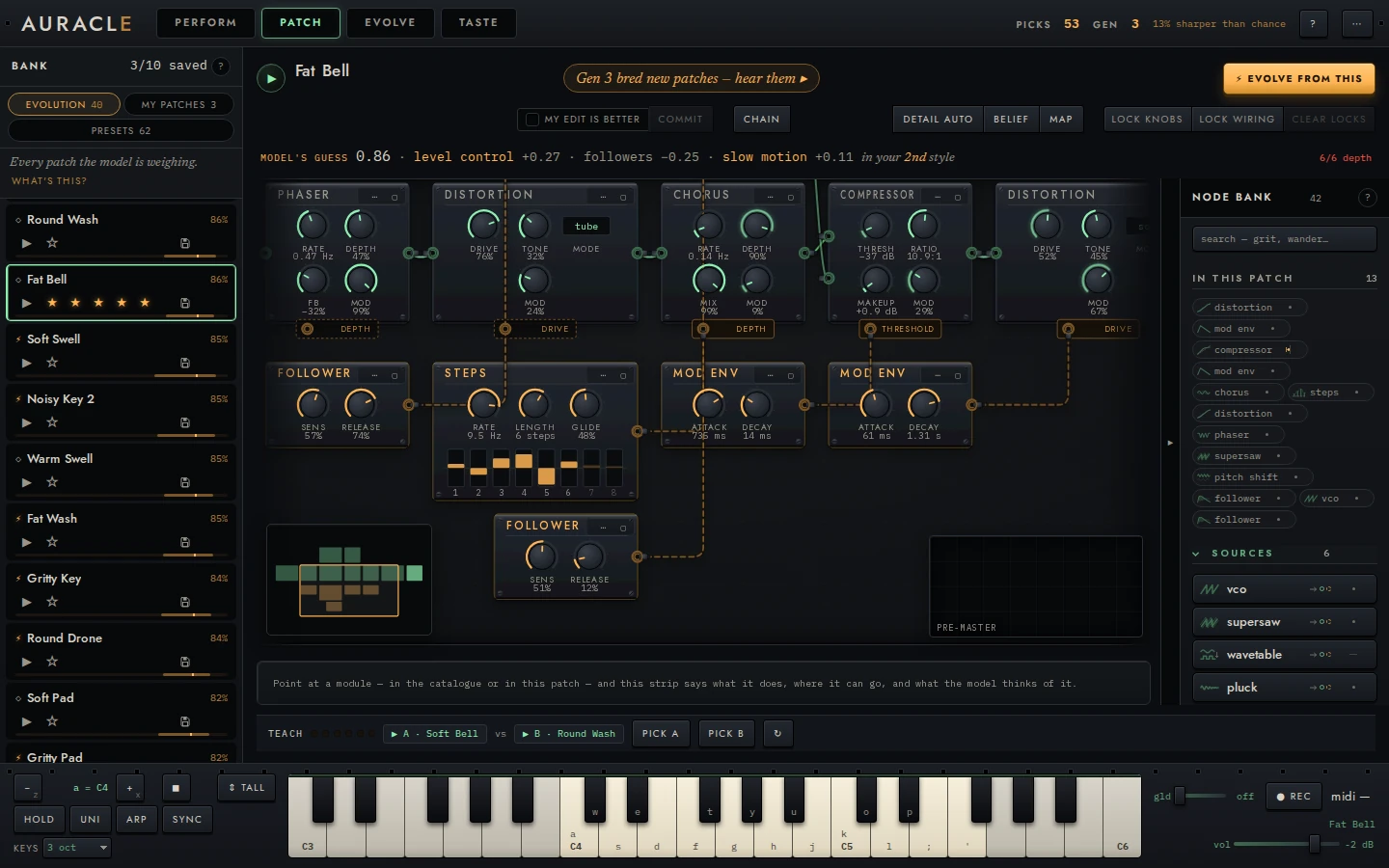
Open a sound and change it
- At PATCH, click a row in the bank. It opens here as the sound you’re playing (a row opens its sound at whichever level you’re at).
- Play it from the keybed. Hold a chord, or run the arpeggiator.
- Drag a knob, and hear it change.
- Press KEEP AS NEW in the edit bar to add your edit to the pool as a new sound. The original stays as it was, and the new sound is safe until it has been in a pick (the bank).
You can also open a sound with ↓ PATCH on either side of a pair in EVOLVE, or by clicking a sound on the TASTE map.
The head
The cap: PATCH · BASS. The family shows only where the engine has one: a preset's category, as it was made. A bred or edited sound has none, and a patch started from nothing says PATCH · FROM NOTHING.
The name, at the level's size, (edited) once you have changed it.
The subtitle counts what the rack is made of: 4 modules · 1 modulator, in signal order. Modules are the ones in the audio path (not the amp, not an empty socket); modulators are the ones moving a knob. With another layout it says packed tight or placed by hand. After it come what is happening to the patch: opening Glass Pad…, 2 locked, silent: nothing reaches the output, 1 edit waiting. Near one of the ceilings breeding searches within (24 modules, a depth of 6, a modulation depth of 3) it says that too: one short of it, its number in amber (5/6 depth); at it, the whole count in amber (6/6 depth), since a patch at a ceiling has no room to grow. An edit that would take the patch past one is refused, and the count of the ceiling it would pass shows in red while the refusal is said, however far from it the patch was. Under the model view the subtitle becomes the belief line instead: what the model makes of this sound.
What a generation changed. On a sound a generation bred, as it was bred, the subtitle starts with its seed and how many changes the generation made (from Reese · 3 changes, counted as its bank row lists them), each module the generation changed or added has a silk tick on its top edge, and each knob it moved shows the seed's value as a pale pointer (the same glyph as a knob you have turned shows where it was when you opened the sound). It is the engine's record of that breeding, so it shows at rest. Edit the sound and it goes, since the patch is no longer the one that was bred; undo to as opened brings it back.
What to do next, a small amber line at the head's top right, and pressing it does the step it names:
- Teach it your taste: 6 quick picks ▸ before your first pick, and 3 more picks and it refits ▸ until the first refit, both taking you to EVOLVE. While a pair is dealt here they leave the count to TEACH at the well's foot (TEACH) and say nothing;
- It’s learned something. Breed a generation ▸ once it has;
- Breeding: keep playing ▸ while the first generation breeds (this one does nothing when pressed);
- Generation 3 bred 4 new sounds: they’re at the top of the bank ▸ after one.
On a fresh session it says nothing until you play: playing first is the first steps'.
The acts, on the name's row:
- ⚡ EVOLVE FROM THIS, amber: breeding from this sound alone. Its ▾ holds the locks that prepare it (LOCK KNOBS, LOCK WIRING, CLEAR LOCKS) and, while a ⚡ that can be stopped runs, STOP EVOLVING. See locks, and evolving from here.
- ADD MODULE (/): opens the catalog.
- NEW PATCH: a patch from nothing.
- HOW TO READ THIS: what each mark on the canvas is, over the well's foot.
Under 1400 px wide the acts show their glyphs only (each says its name on hover); ⚡ keeps its words.
The edit bar, on the subtitle's row, once you have edited the sound: 2 changes · KEEP AS NEW · PICK THE EDIT ☐ · UNDO TO AS OPENED. The count is the undo steps since you opened the sound, the number ⌘Z would take back. KEEP AS NEW plays your edit against the original and asks which you'd reach for (keep an edit as a new sound); PICK THE EDIT, ticked first, skips that once. UNDO TO AS OPENED (↺ in a narrower window) takes every change back at once, in one render; its toast's undo, or ⇧⌘Z pressed once per change, brings them back; the toast says so once the sound is back as it was opened, and its undo retires as soon as anything else changes the patch. Pressed when it can't go, it says why: Already as it was opened, Waiting for the last edit to land, Waiting for the sound you opened to arrive (another sound is on its way, and these changes are the sound you are leaving). Past the 60 steps undo keeps it says so and leaves the rest to ⌘Z.
The well
The modules, in signal order, at about the size the patch opens at on a 1440 px screen: each one's name in caps, and on the right of its head the setting that says which kind of it this is (vco · saw, filter · svf lp, lfo · tri), which a click changes. Under every knob its value as set, in its own units, then its name (448 Hz / cutoff); a setting that is not a knob prints its value where the knob would be, over its name and a dotted rule (-1 / oct), and a click changes it too. The amp's head draws its envelope from its four knobs: attack, decay and release each as the share of its knob's travel, sustain as its level; it draws the knobs, not the sound. A modulator is dashed, under the module it moves. The selected module (the one you pressed on, or the keyboard stands on) has its edge and name lit, and its ⋯ (its structure menu) and ▢ (its lock) on its top edge, at the right; the others show them under the pointer. A locked module's edge is solid amber. Under detail: automatic (the default), drawn smaller than its own size (a narrow window, a big patch, the catalog open beside it), each module's name prints larger, so at the fit it never reads smaller than the rest of the app's text, and the values and labels go once they would print smaller than the rack's own type; every knob is still there to turn. Zoomed out further by hand, each module keeps three of its knobs to read; zoom in for the rest. See reading and editing the rack.
OUT and the face. The amp's lead runs to OUT, and past it stands the sound's face: the face of the patch as it stands, measured on its latest render (an edit shows once its render lands), the same face as the sound in hand in the menu bar. It is never an estimate. A click on it plays the standard phrase, as Space does. Pressed while an edit is still on its way, it wears a dotted amber ring and plays once the edit lands; press it again to take that back. Space plays the same phrase from PERFORM and EVOLVE, and waits the same way: ▶ waiting for the edit… stands in for the name in the menu bar until it lands. While you play, what you hear is drawn over the face, and fades when the sound stops (while you play it). Coming to PATCH from another level, the face flies here from where that level drew it (or fades in, from a level that doesn’t draw it). A sound opened from the bank while you’re here flies from its row to the sound in hand in the menu bar, and OUT shows its face once the rack is that patch.
Without this module. Select a module and, over the face at OUT, a dashed outline shows the face of the patch without it: what that module does to the sound, by eye. It is measured, not estimated: the engine renders the patch as the structure menu would leave it (a processor bypassed, a source's socket left empty, a modulator unplugged) and takes its face. It takes a moment (about three seconds after a fresh open on a fast machine), and nothing is drawn until it lands: it waits for work you asked for, the model's guess and cable levels, and PERFORM's measurement of the sound it plays, but goes before the bank's faces and PERFORM's background re-checks. Once measured, the same module on the same patch comes back at once. A knob of that module leaves it as it is (the patch without it is unchanged); any other edit takes it away until the patch is measured again. When the patch would be silent without the module (the only source), the readout says silent without it instead; when it would not pass the safety check, without it, it fails the safety check. The amp and an empty socket have no outline.
The cables. Each green cable curves from one module's output to the next one's input. Into a module you've placed by hand anywhere but clear to the right of the module feeding it, the cable runs backwards, below both in straight lines, on purpose: it says at a glance that it goes back. Each carries light by the level the engine measured on it, and a mark on its middle lights a bar for each third of the meter's range; point at it for the number. A module with two inputs names them beside the cables that arrive (a, b, or carrier and mod). A modulation cable is dashed amber, pulses at its modulator's rate, and says how far and how fast it moves the knob, depth 25% · 0.51 Hz: the module's mod depth and the modulator's rate, as their knobs are set. A module's modulation input nothing is plugged into is drawn faintly under it until you point at the module. Cables and their levels. AUDIO IN modules that read the same input show it as one stream fanning out to each.
The edges. When the patch is wider than the view, each side says how many modules lie past it (‹ 2, 3 ›); a press brings the nearest one in (the amp with OUT and its face, as one). A patch too big for the well at the size its names read (a big patch, a phone) opens at that size showing where it starts, and the rest past the right edge: drag to it, press n ›, or press MAP for the whole patch.
The model's guess, along the well's top once the model has fitted your taste: GUESS · REVERB, then its reason in the model's italic, then how likely it guesses you'd pick the patch with it over the patch as it is:
GUESS · REVERB it moves toward still, as your picks lean · 67% · leaning
The module itself is drawn dashed amber at its place in the patch: above the cable it would be patched into, over the empty socket it would fill, or under the module whose modulation input it would take, with a dashed lead to that place. It stays in view: with no room above the cable it hangs below the patch, or at the top of the view. Click it (or reach it with the arrows and press Enter) to add it, the same edit the catalog makes, and ⌘Z takes it out. Its × (or Delete) skips it: that kind of module stays away from that place for this patch, and the next guess shows. Undoing a guess you added counts as skipping it. The catalog marks the guessed module with an amber dot beside its name.
Beside the guessed module stand two faces: as it is, the patch's own, and with it, the patch with the guessed module added. The second isn't an estimate: to rank its guesses the engine rendered the patch with each candidate module, and this is that render's face. Until a face arrives its place stays empty; an empty patch has no sound, so it has no as it is. Both describe the patch as it was when the guess was made, so turning a knob takes them away: a knob doesn't change the guess, and the faces come back when the next one is made (after you add, remove or skip a module, or open another sound).
- It ranks by how sure it is the module helps, not by the percentage, so its first guess can be one it isn't sure of. Then the line ends it may not help.
- Before the warm start it has nothing to guess from, and shows nothing.
- With no room left (the patch is at a ceiling), it says no guess: nothing more fits, so a module has to come out first.
- On an empty patch, the percentage is over your pool's average sound, and the line says so.
What goes here? The guess looks at the output. To ask about another place, select a module and choose what goes here? from its ⋯ (or press Q on it): the model ranks the modules that could go after it, on its modulation slot, or in it if the socket is empty (on a modulator, its module's slot), and draws its guess there, saying where (GUESS · DELAY · AFTER THE MIX) with its reason. While it listens, the line says hearing the modules that fit at the mix…. Click it or press Enter to add it, × to skip it (the next for that place shows), and Esc on it, or the ✕ at the end of its line, to go back to the guess for the output, which also comes back after any change to the patch's structure. Asked with Q, the guess takes the keyboard's focus when it lands, unless you have gone into a module's knobs since. Before the warm start it says no guess yet: it needs a few picks first. It renders within the same budget as the guess at the output.
It is worked out again after each change to the patch's structure and after each refit, never per knob turn: it renders the modules that could go at the output, all of them on a render crew where the machine has the cores, or the likeliest eight with none. A guess takes a few seconds, longer the first time: the crew has to start (and right after the warm start, the refit runs first), and the three seconds of rendering it allows itself count from there. How it guesses.
The thing in hand. With a module taken from the catalog, the well's top line is about it instead: its name, in hand, its price (what the model expects it to be worth: it prices what you are adding, not where, the same at every lit socket), ▶ to hear it at the socket under the pointer (with that socket's scope), how many sockets are lit, and what happens at the socket under the pointer (insert after filter). ✕ or Esc puts it down. Adding a module.
The foot. Along the well's bottom:
- The camera, bottom left: FIT, −, +, MAP, and the layout's ▾ (chain, compact, by hand; snap to the grid and reset positions for a layout by hand; the level of detail). See getting around.
- SET ASIDE n, beside it, once anything is set aside: anything you unplug, delete, or bypass lands there instead of vanishing, and stays across a reload. It opens the shelf; drag a module's ● back onto a lit ○ to put it in. The catalog lists them first too. The socket a module left reads empty and makes no sound.
- The readout: the module under the pointer, or the selected one, by name, with its setting and what it does in one sentence. Where PERFORM's named controls turn its knobs, it says which, as PERFORM measured them: for the knob under the pointer (or the one the keyboard is on) BRIGHT and SPACE turn this cutoff, and for the module BRIGHT turns its cutoff and res; SPACE turns its decay. PERFORM measures the sound it plays, so a sound opened here that PERFORM hasn't measured yet says nothing of it. Pointed at in the catalog, a module's longer description opens over the well's bottom edge: its ports, what it arrives set to, and what is heard, and, while you hold ⌥, how your taste leans on it. Where the foot is narrow (beside the catalog, or in a narrow window) its parts stack and it scrolls.
- TEACH · 6 PICKS ▸, bottom right, while a pair is dealt: see TEACH.
The scope is put away until you ask for it: Scope & analyzer… in ⌘K sets it up (waveform or spectrum, where it listens, FFT size, color, corner, size, trigger, and freeze) and brings it into its corner of the well, tracing the output while you play. It steps out of the way of any module it would cover.
The model view in PATCH
Hold ⌥ (Alt off Apple platforms), or press and hold MODEL in the menu bar, and PATCH shows what the model believes about the patch; let go and the canvas is exactly as it was. Tap MODEL to keep it up: that is how it stays on while you work, and it is still up after a reload. A tap again ends it, and so does Esc once nothing nearer is waiting for it: in PATCH a press first walks out one thing (a menu, a module in hand, the guess for a place, the selected module, the catalog), and the view stays. On a touch screen, MODEL's press and hold is the model view (a finger held on a module opens its menu, as before). Nothing here is shown at rest, and every mark is the model's own data:
The belief line, in place of the subtitle's counts, in the model's voice; what is happening to the patch (opening…, 1 edit waiting, 2 locked, a bred sound's seed) stays after it:
it’d like this 79% · fairly sure · was 74% ▲
That is how likely it guesses you’d pick this sound, and a word for how sure that reads. The words come from one scale: a hunch (46–54%), leaning (55–69%, or 31–45%), or fairly sure (70% and over, or 30% and under). was is what it said before your last edit, and the arrow shows only when the printed number moved. While an edit is on its way, the line dims and ends in · rating…: the model rating the edited sound again. When the model has no basis for a guess it says why instead of printing a number: no guess yet: it needs a few picks first, fitting to what you taught it…, or nothing to rate: no source reaches the output (the patch’s only source socket is empty). Near a ceiling the budget stays beside it.
The readout, at the well's foot, with nothing selected: what adds up to that number. The three qualities that count most, each with its part of the model's utility (they add up to it exactly), the style that rates it highest, by name, and the utility itself with its doubt:
THE PATCH   even branches +0.39 · plucked strings +0.18 · mod chaining +0.17
            in your analog sustain style   utility 1.43 ± 0.31
With a module selected (or under the pointer), a note opens above the readout: its family's part of that utility (filtering +0.12 of this patch’s utility), then which way your taste leans on that family, from how many of your sounds. The model counts how many of a family a patch has, not which one is where, so the note is about the family (a filter, an EQ and a vocoder share one), and says so.
Each module's edge is tinted by which way your taste leans on its family: amber toward, red away, stronger where the model is surer. A family it has only a guess about, or too little evidence for, gets no tint, and when no module's family is settled the model says so in the well's top right: no settled lean on anything in this patch yet.
What each kind is worth, in the well's top right: one chip for each family of module the patch holds, with what one more of that family is worth to the model, in the same units as the readout's parts (filtering +0.12). It is a chip per family, never per module: the model counts how many filters a patch has, not which is which, so two filters share one figure (VCOs −0.07 · shared by 2), the same wherever they sit. A figure the model isn't sure of is dashed and says a guess; a family too thin to price gets no chip. It is the price the catalog quotes for a module in your hand.
The edges, the chips and a selected module's note all read one style: the one that rates the patch highest, which the readout names.
The guess's runners-up. Beside the model's guess, the two it ranks next, fainter and smaller, each with its lower bound (2 · DELAY, lower bound +0.03): the guess is ranked by that bound, what it expects the module to add less its doubt, so these are the next two it would show if you skipped. A runner-up for another place in the patch has a faint lead to it. They are only to read: the guess itself is what Enter adds.
Reading what it learned says how to read all of it.
The catalog
ADD MODULE (or / from anywhere in PATCH) opens the catalog over the well's left: its search (grit, vowel), what is set aside, what is in this patch, then every module by group, each with what it does to a signal and its cables. ✕ or Esc closes it. While it is open the patch is fitted beside it. Hold ⌥ (the model view), or press model, to see which way your taste leans on each module: its bar in the list, a line in its description, and in the card that stands beside the catalog while the keyboard walks it. At rest they leave it out. On the canvas the same view tints each module's edge (the model view in PATCH). Wiring and the catalog has the rest.
TEACH
TEACH ▸ at the well's foot opens the same pair EVOLVE deals, over the well, so you can pick without leaving PATCH. Until the first refit it counts the picks still to go (TEACH · 3 PICKS ▸); the head's next step leaves that count to it. ▶ A and ▶ B put each sound under your keys, and then PICK A, PICK B, or ↻ for another pair; ← BACK returns to the sound you were playing. ✕ or Esc folds it.
First steps
The first time, PATCH's own first steps show one at a time in the pill under the well: play it (a key, or the face at OUT; already done if you have played), drag a knob, lock what you love, ⚡ EVOLVE FROM THIS. Each ticks off when you do it; × stops showing PATCH's steps, and PERFORM's still show there (and the other way round).
On a touch screen
On a phone held upright the head is stacked over the well (the name, what the patch is made of, then the acts on one line), and the readout takes its own line over the camera at the well's foot. With the keys up the well is short, and keeps only the rack: the words and the well's foot come back when the keys go. The patch opens at the size its names read, showing where it starts: swipe across the well for the rest. Two fingers on the patch zoom it. On a phone on its side the catalog (ADD MODULE) is the screen's height.
Tap a module to open its settings in a sheet: every knob as a wide slider with − and + steps, every named setting as its choices, AUDIO IN's input line, MONITOR, NEW CLIP and ALLOW INPUT, and CAPTURE's RECORD, each a finger's size. The sound's face stands beside them: as made, measured once you have edited it, measuring… while an edit is on its way. Hold − or + to keep stepping. Close it with ×, a swipe down, a tap outside, or Esc. REMOVE MODULE at its foot deletes the module, as delete in its ⋯ menu does. Every module shows its ⋯ on a touch screen; hold a finger on a module for the same menu, where what goes here? is too. A tap on the rack beside a module's ⋯ or its lock is theirs, as a tap on them is (a tap on the module itself opens its settings), and a tap beside an out ○ picks its cable up; then tap beside a lit ○ to put it in. Press and hold MODEL for the model view while your finger stays down, or tap it to keep it up.
How it works: edits in order
How it works: edits in order
Every knob is live, and every structural edit is a grammar operation, so you can’t break the patch into something unplayable. Edits reach the engine in the order you make them. If the engine is still working on the last one, the next waits its turn and then happens: its module is outlined, and the subtitle says 1 edit waiting.
⌘Z (Ctrl Z) undoes the last thing you did, even while the engine is still catching up. Show measurements, in ⌘K, adds the sound’s id and a short structural summary to the subtitle, and all three budget ceilings (8/24 modules · 4/6 depth · 1/3 mod depth).
A patch from nothing
NEW PATCH empties the sound you're playing down to its amp envelope: the
cap reads PATCH · FROM NOTHING, the name New patch, the subtitle 0 modules
· nothing to hear yet, and the well holds one empty
socket before ENV / OUT. The catalog opens beside
it. Then:
- Add modules from the catalog, or take the model's guess.
- Delete any module from its ⋯ menu. A source leaves its socket empty; the toast's undo, or ⌘Z, puts it back.
- CLEAR empties it again, with an undo.
- KEEP AS NEW adds it to the pool as a sound of its own, once it makes a sound.
BACK TO the sound's name (or Esc, once nothing else is waiting for it: a selected module, then the catalog) reopens the sound you started from. A new patch with modules in it waits: NEW PATCH from that sound brings it back. ⌘Z past the start, or opening another sound, also ends it.
In ⌘K
At PATCH, ⌘K’s list starts with THIS LEVEL, each with its key where it has one: Add a module (/), How the catalog works (its walkthrough), How to read this patch, ⚡ Evolve from this and the three locks of its ▾ (Lock knobs, Lock wiring, Clear locks), Keep as new and Undo to as opened once you have edited, Undo an edit (⌘Z, one step) and Redo an edit (⇧⌘Z), the camera (Fit the patch ⇧Home, Fit what you’re on ., Actual size ⌘0, Zoom out on the patch ⌘−, Zoom in on the patch ⌘=, Show the minimap), the three layouts, The first module (Home) and The last module, at OUT (End), Set aside: the shelf and Teach it your taste while they show, and New patch (or Clear the patch and Back to the sound you started from, in a new patch).
The three things PATCH is for
Hearing a sound properly
The standard phrase is five seconds and the same for every sound, which is what makes two sounds comparable. It isn’t a performance, though. Play the sound from the keybed: hold a chord, run the arpeggiator. A sound that seems thin on the phrase can be the one you’d reach for under your hands.
Changing it
Drag knobs, click a named setting (or, from the keyboard, press Space or Enter on it) to cycle it, drag cables between jacks, and place modules from the catalog. Your changes stay on the sound you’re playing until you press KEEP AS NEW. That adds the edit to the pool as a new sound, and leaves the original alone. Turning knobs has the details.
Aiming the search
- Lock the knobs or the wiring you like.
- Press ⚡ EVOLVE FROM THIS.
Breeding then changes everything except what you locked. See locks.
Find a sound whose character you like but whose envelope is wrong. Lock every knob except the envelope’s, and press ⚡ EVOLVE FROM THIS. You get variations that differ only where you allowed them to.