The bank
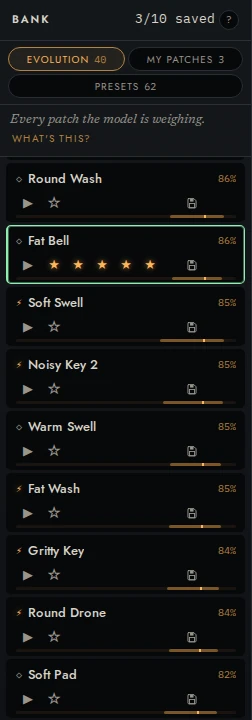
The bank, on the left of every level, holds your sounds in three tabs. This page is about finding a sound, keeping it, seeing where a bred sound came from, what the model thinks of each, and knowing which sounds a generation may replace.
| Tab | What it holds |
|---|---|
| POOL | The sounds the model weighs and breeds from |
| SAVED | The sounds you saved. No generation replaces them |
| PRESETS | The hand-made library that came with the instrument |
Each tab carries its count, and its tooltip says what it holds. SAVED’s tooltip also counts your saves (3 of 10 saved), and its count turns amber when every save is used. While the pool is still filling after a start, POOL reads +12 beside its count, the sounds still on their way.
The ? at the end of the find row walks you through the three tabs and what a generation is, starting at the tab you’re on.
On a window under 1000 px wide the bank is not on the left: the button of three lines, at the start of the menu bar, opens it as a sheet over the level (from the left, or on a phone held upright from the bottom). A sound chosen in it opens and the sheet goes; a row's ▶, ★, save and cut leave it up. A tap beside it, Esc, that button again, or on a phone its handle pulled down, puts it away.
Find a sound
Type in Find a sound under the tabs, and the bank keeps only the sounds whose name, family, or description has what you typed: bass, bright, saws. It works in every tab, and what you typed stays as you switch tabs, rate, cut, or rename. While it narrows POOL, the rows stand on their own, without the groups below. Esc clears it.
A preset’s family and description are its own; a pool sound you opened from a preset is found by that preset’s too. Typing in the field plays no notes.
Find and keep a sound
- Click a row to open it as the sound you’re playing. You stay at the level you’re at, and its face flies from the row at once to where that level shows it (PERFORM’s well, its mark on TASTE’s map), or to the sound in hand in the menu bar (from EVOLVE, and from PATCH, whose rack follows once the sound has opened). The well keeps the face it had until the new one lands; with reduced motion set, the new face is simply there.
- Point at a row (or put the bank’s cursor on it) and its actions appear on the line under its name (on a touch screen they are always there): ▶ plays the standard phrase without opening it.
- ★ opens five stars in the actions’ place: press one to rate the sound and teach the model what you think of it. From the keyboard, 1–5 rate the row under the cursor.
- The save icon (a disk) keeps it: no generation will replace it.
- × cuts it: it tells the model “not this one” and takes the row out of the pairs.
From the keyboard, [ and ] step through the bank at any level; the keys are below.
Reading a row
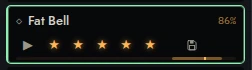
- The face, left of the name, is the sound’s face: its spectrum against the rest of the bank, from the sound’s own render. Every row keeps the face’s column, so the name is in the same place before the face arrives, and the bank is wider by the column rather than any name narrower.
- The glyph says where the sound came from: ◇ grown fresh, with no taste in it yet; ⚡ bred toward your taste; ✎ your edit, kept as new; ▤ a hand-made preset.
- NEW, in the glyph’s place, marks a child of the latest generation (every one of them is bred, ⚡). In POOL, those children lead the list under NEW · GENERATION 3 and their count, in the order they were bred, and the rest follow under IN THE POOL, in the order they joined it. A child of ⚡ evolve from this joins the group the same way, since ⚡ counts as a generation of its own. If the generation bred children the pool didn’t keep, a line under the group counts them (2 more were bred and rated below the pool.).
- The green dot after the glyph marks a child you haven’t heard yet. It goes when its phrase plays (its ▶, a pair’s ▶ PLAY, Compare, or Space while it’s the sound you’re playing) or you play a note on it, and it is remembered across a reload until then. Playing an edit of it doesn’t count: that’s another sound.
- The name comes from what the sound is, and it keeps that name as the bank changes around it. Double-click it to rename it. NEW and the dot sit in a column every row keeps left of the name, so the name never moves for them. On a computer’s or a tablet’s screen a name has the row’s width, the first of the row’s two lines. The actions and the stars are on the second, so pointing at the row or opening its stars never covers the name. On a phone the actions you swipe out and the stars share the name’s line and take the room at its end: the name ends where they begin. A name too long for the room it has ends in an ellipsis, and the whole of it is in its tooltip. The words a row carries while you point at EVOLVE POOL (SEED, MAY BE REPLACED) and the model view’s percentage are the exceptions: they stand over the end of the name’s line while they show.
- The line under a bred sound’s name says which seed it grew from and
what changed: from Soft Pad · +delay, cutoff 1.2 kHz → 3.4 kHz, the first
three changes and then how many more. The modules are counted, so the line
says what the patch gained and lost: a module that moved from one place in
the patch to another isn’t a change, and a swap (
filter → delay) is said only where one module went and another came. Click the line, the row’s EVOLVE mark among its actions, or press c on the row, to compare the sound with its seed. - The actions, on the line under the name, at the row’s end, when you
point at it or the cursor is on it: the EVOLVE mark for a bred sound
(compare), ▶, ★, the save icon and ×. Out of sight they can’t be
pressed either. Every row keeps that line, so a row is as tall with its
actions or its stars showing as without, and none moves when you point at
one. On a touch screen every row shows them at rest, on a line under its
name, since a tap on the row would open it. On a phone the ▶ is at the
row’s end and the others slide out beside it when you swipe the row left;
the name keeps the room to their left, and ends in an ellipsis where it
doesn’t fit.
- ▶ plays the standard phrase, and shows ■ while it plays. If it has to be rendered first, a dotted amber ring says it’s on its way.
- ★ opens the five stars; a rated sound’s ★ is filled. Rating teaches the model.
- The save icon keeps it, and teaches nothing: Saved Glass Pad. No generation will replace it (3 of 10 saved). The row shows it saved as you press. If every save is used, the row goes back and the toast says so: That would pass your limit of 10 saved sounds. Release one first.
- × cuts it, which teaches the model “not this one”. The sound is never dealt to you in a pair again; if it was on the cards, a new pair is dealt. The toast, Cut Soft Wash. It won’t be dealt again., carries UNDO for seven seconds (⌘Z, or Ctrl Z, does the same), and nothing is recorded until they’re up.
A cut sound stays in the pool until a generation replaces it. With Show measurements on, a row also shows its id, and its tooltip its signature.
The rows hold still under your hand. While your pointer is over the bank, a finger is on it, or you are stepping through it with the arrow keys, what would move them on its own waits: a generation's child landing, a generation's end, the pool filling, a refit's new order under the model view, ⚡'s child. It lands when the pointer leaves, or after a second of rest, the rows that moved gliding to their places, and the list scrolls so the row under the pointer stays where it was, as far as it can scroll. What you do yourself shows at once: a star leaves the row under the pointer where it is, and a cut takes its row out and the rows below close up. The tabs' counts change at once: they move no row. Pointing at a row, and opening its stars, move none either. Turning a knob redraws no row, so a click on the bank is never lost to one.
What the model thinks of each: hold ⌥
Hold ⌥ (Alt off Apple platforms), or press and hold MODEL in the menu bar, and the bank shows the model view:
- A percentage at each row’s end: the model’s guess, roughly how likely you are to pick this sound in a pair. Its tooltip adds the word for how sure that reads (59% · leaning). Before the model has been fitted it reads ·.
- A bar along the row’s foot draws the same guess. The bright tick is the guess, and the dimmer block around it shows how unsure it is: a narrow block is a sure guess, a wide one an unsure guess. Before the first fit it is hatched: there is no guess yet.
- The pool in the order the model rates it, highest first, under RANKED BY THE MODEL, once it has been fitted. The rows glide to their places, and when you let go they glide back to the order they joined the pool. NEW keeps its children in the order they were bred. A refit's new order waits while your pointer is over the bank, as the rows do.
Let go and the bank is as it was. A tap on MODEL keeps the model view up until you tap it again or press Esc. The row’s actions still come when you point at it. A screen reader hears the guess in every row’s name, at rest too.
On a touch screen, a long press on a row shows the model view while your finger stays down, and opens nothing. A row's actions stay on it at rest, under its name, as before.
Compare a sound beside its seed
Click the line under a bred sound’s name, its EVOLVE mark among the row’s actions, or press c with the bank’s cursor on it. Compare opens beside the bank:
- The figure draws the seed’s phrase as a dashed outline, and the child’s growing out of it into its own. Only the two ends are the engine’s: a walk keeps no record of its steps, so the frames between are the one shape turning into the other, not the walk’s path.
- What changed, every change the walk made, one a line: modules added
(+) or removed (−), a module swapped (
filter → delay), counted as the row’s line counts them, and knobs in their own units. A walk can change a couple of dozen things, and past about ten lines the list scrolls. - What the model rated each when it bred them, in its own words: when it bred them, it rated Soft Pad 60% · leaning and Warm Drone 2 52% · a hunch. A child rated well below its seed is marked exploring, as the EVOLUTION marks it.
- ▶ for each, the seed and the child, while both are in the pool. A seed a generation has replaced is only a name (Soft Pad · replaced): its sound was dropped, so there is nothing to play.
Press Esc, ×, or click anywhere else to close it. From the keyboard, Esc hands the keys back to the bank.
Stars are not saves
The two controls do different jobs.
★ teaches. A star rating goes into what the model learns from, and moves its guess about your taste. Rate the sounds you wouldn’t reach for, too: that is information.
save keeps. It lists the sound in SAVED as well as POOL, and no generation replaces it. It records nothing about your taste.
They are kept apart on purpose. The pool replaces the sounds the model rates lowest. If a star decided what stayed, a high rating would become a way to protect a sound, and every protective rating would teach the model a taste you don’t have.
The pool has a fixed size, and each generation replaces the lowest-rated sounds it can: any that aren’t saved, once they’ve been in a pick. A sound you starred but didn’t save can be replaced. Stars are for teaching; save is what keeps.
A sound you keep as new is safe until it’s been in a pick
A sound you make in PATCH and keep as new, or open from a patch file, isn’t replaced until it has been in a pick. Until then nothing replaces it, not a generation, not a preset you open, not a ⚡ child, even when the model rates it lowest of all: it hasn’t heard an answer about it yet. These end the wait, with the sound on either side, whatever you picked:
- a pair in EVOLVE (or PATCH’s TEACH) with it in it;
- an offer in PERFORM you heard and answered while playing it, TAKE or NEXT, counted when the answer is (after its window), and only if you had kept the sound before you answered;
- keeping an edit of it as new with an answer: you picked between your edit and it on the WHICH WOULD YOU REACH FOR? card, or ticked PICK THE EDIT;
- a cut: you told the model “not this one”.
The question KEEP AS NEW asks about the sound you’re keeping doesn’t count: that one is about the sound you edited from, and the new sound is safe whatever you answer. SKIP COMPARING on a later edit doesn’t count either, and nor do stars. After its first pick it’s an ordinary pool sound, rated and replaced like any other, so save it if you want to keep it for good.
It isn’t a save. The row carries no mark, it doesn’t count toward your saves, and it isn’t listed in SAVED. A quarter of the pool, 10 of 40, can wait this way at once, not counting any you have also saved: keep an eleventh as new before any of them has been in a pick, and the oldest of them goes back to being an ordinary pool sound (it stays in the pool; it can be replaced again). Saves and these together never take more than half the pool, so there is always room for what a generation breeds.
Which sounds a generation breeds from, and replaces
The pool holds 40 sounds. A generation’s children join it as they are bred, and when the generation ends (or you stop it), it replaces the lowest-rated sounds it can to bring it back to 40: not a saved sound, nor one you kept as new that is still waiting for its first pick (above), nor the pair on EVOLVE’s table or a pick you can still take back. The toast names them: Generation 3: 4 new sounds in the pool. It replaced the 4 lowest-rated sounds it could: Bell Jar, Soft Wash, Glass Rain, and 1 more.
- Hover EVOLVE POOL in EVOLVE (or move the focus to it). The ten sounds the next generation would breed from get a solid amber rail and SEED; the sounds it may replace get a dashed rail and MAY BE REPLACED. No other sound can be replaced when it ends, but for a sound you kept as new that has its first pick while the generation runs. A saved sound is never marked, and nor is a sound you kept as new that hasn’t been in a pick yet. The pair on EVOLVE’s table can be marked: nothing replaces it while it’s up, but you’ll have put it away long before the generation ends. Up to four more sounds are marked than the generation can replace, because when it ends it passes over the pair up then, and a pick you can still take back, and replaces the next sounds instead. The words sit at the row’s end, on the name’s line, and give way while you point at the row, so no name moves.
- Save any you want to keep before you press it.
The marks are the engine’s own lists, and they move as your picks move the model’s ratings.
While a generation runs, hovering EVOLVE POOL marks that generation’s seeds, and WILL BE REPLACED on the sounds its end will replace, whether you stop it now or let it finish: none before its first child, then one more with each child it takes in. That isn’t all that can go: each child still to come can add the next lowest-rated sound it can replace. A save still keeps a sound while the generation runs: its mark goes, and the sound that will be replaced in its place is marked instead. The pair on EVOLVE’s table, and a pick you can still take back, are kept the same way, but only while they’re there: once a pair is put away, its marks come back.
While ⚡ evolve from this walks, hovering EVOLVE POOL marks its seed, and MAY BE REPLACED on the one sound its child would replace: the lowest-rated sound it can replace other than its seed, if the pool is full and the child rates high enough to join it.
When a generation ends, REPLACED · GENERATION 3 at the foot of POOL counts what it replaced. Click it for their names. Names are all that’s kept: a replaced sound can’t be played or brought back.
Saves are capped at a quarter of the pool, 10 of 40, so the pool always has room for new sounds. The engine’s own default pool is 48; the app asks for 40, which is why the reference quotes 48.
Presets
Sixty-two hand-made sounds in seven families (bass, lead, keys, pad, texture, perc, and weird), browsed in place under each family’s name and count. A preset’s description is its name’s tooltip. Each row carries the preset’s face, from a render of the preset itself made ahead of time and shipped with the app, so no row waits for a render of its own: each has its face as soon as your bank has faces to draw it against.
- Open PRESETS.
- Point at a row and press ▶ to hear it (on a touch screen the ▶ is always there), or click the row to open it as the sound you’re playing.
The engine can only play what it holds, so a preset you hear or open joins the pool and replaces the lowest-rated sound it can. The toast names what it replaced (It replaced the lowest-rated sound it could: Bell Jar.), and saved sounds are never among them, nor is a sound you kept as new that hasn’t been in a pick yet. From then on the row reads IN POOL at its end, on the line under its name, just left of its ▶ whenever the ▶ shows (on a tablet, where the ▶ is on a line of its own, it stays level with the name at the end; on a phone it is level with the name too, left of the ▶, and the name stops short of it), and a second click opens the same copy.
The presets are worth playing through early. They are what the warm start draws from, and they cover the range of modules more evenly than the fresh sounds do.
The bank from the keyboard
The tabs are one tab stop: ← and → (or Home and End) show the next bank as they move. Find a sound and the walkthrough’s ? are the next stops, and the list is a single stop after them. In the list:
| ↑ ↓ | Move the cursor (the row’s actions show on it) |
| Enter | Open the sound |
| 1–5 | Rate it |
| m | Save it |
| c | Compare a bred sound with its seed |
In PRESETS, Enter opens the preset under the cursor and p plays it. p is also a note (D♯), but not while the presets list has focus.
The save key is m rather than s because s is a note, and note letters get through even when a control has focus.
A screen reader hears each row’s whole state (name, saved, rating, and the model’s guess), because the row’s buttons sit outside the tab order.
What to try next
- Save the sounds you’d reach for again, before your next generation.
- Rate a few sounds you wouldn’t reach for: low stars teach too.
- Hold ⌥ and see which sounds the model rates highest, and how sure it is of each.
- What the model learns from says how stars, picks, and cuts differ.