EVOLVE: breeding sounds you’d reach for
EVOLVE is where you teach the model and breed from what it learned. It plays you two sounds, you pick the one you’d reach for, and EVOLVE POOL grows new sounds toward your picks.
EVOLVE is the level beside PERFORM: ⌥← (or ⌥3, or the stop left of PERFORM’s) goes there, and ⌥→ comes back. Zooming from it is measured from PERFORM: ⌥↑ goes to TASTE, ⌥↓ to PATCH.
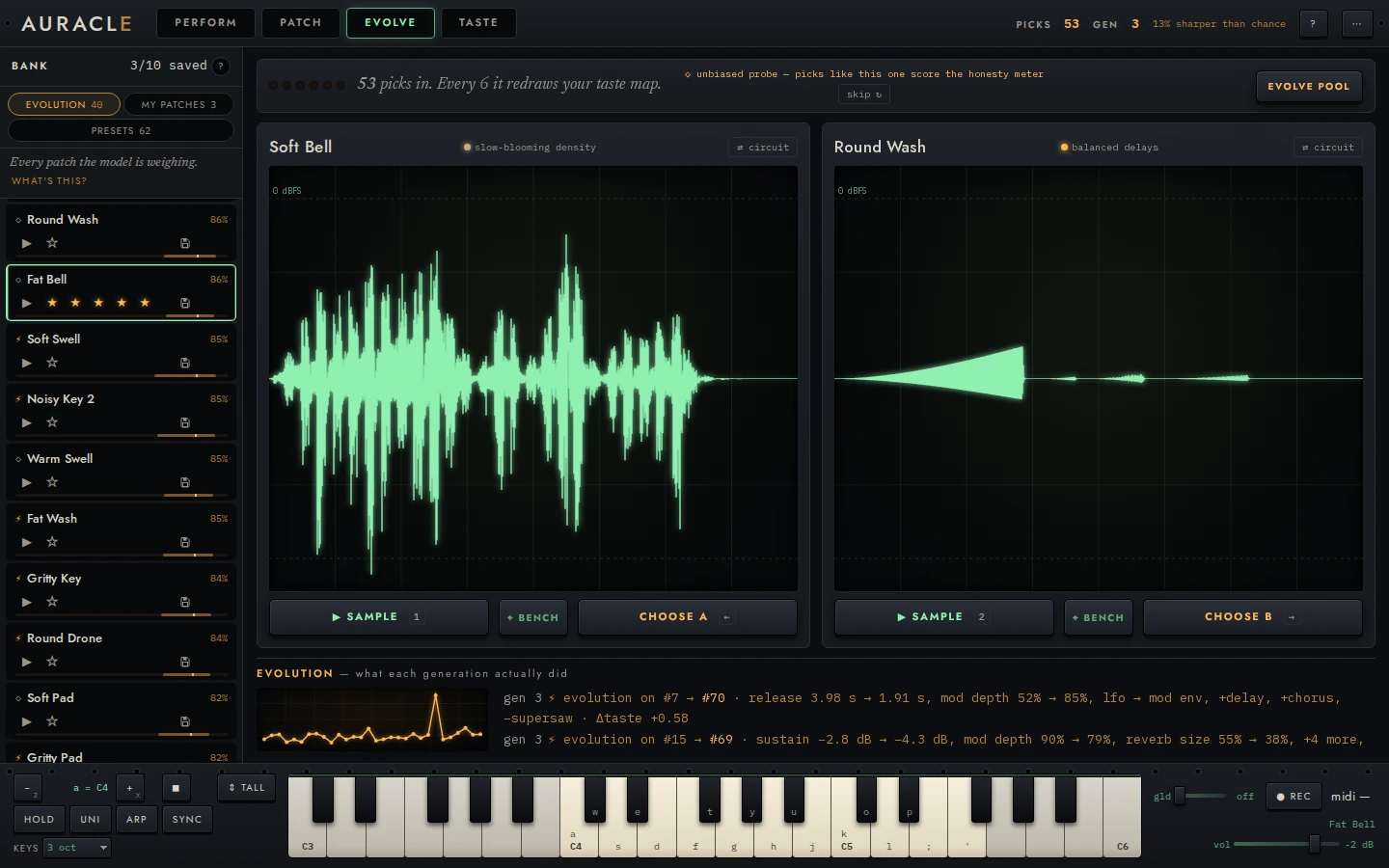
Pick between two sounds
- Press 1 and 2 (or ▶ PLAY on each card) to hear A and B. Press again to stop.
- Click a card’s body to play that sound live on the keys, when the phrase doesn’t tell two sounds apart. Its face flies from the card to the sound in hand in the menu bar.
- Press ← or → (or PICK A, PICK B) for the one you’d reach for.
- Press ANOTHER PAIR (N) to deal a new pair without picking. It records nothing.
Both sides play the same five-second phrase: a held C4, a C5 stab, a C4 and E4 together, and a low C3 with a long release. The same phrase is what makes two sounds comparable, and the reference says why each part is there.
A pick counts the moment you make it: TAUGHT in the menu bar and the pips move at once. For seven seconds you can take it back, with ⌘Z (Ctrl Z) or NOT WHAT I MEANT on its toast (Picked Glass Pad over Soft Wash.). After that it goes into the log for good. Nothing replaces the two sounds of a pick in those seven seconds, nor the pair on the table: not a generation, not a preset or a patch file you open. So a pick on a whole pair counts, unless a generation ended in the moment the pair went up (below).
⌘Z in EVOLVE only ever takes back a pick or a cut. With none to take back it says Nothing to undo here. PATCH edits undo in PATCH.
What you see
On a phone the head is the pips and the teaching line (the bar along the bottom names the level, and the line asks the question), the small map runs the screen's width under it, and each card keeps its PLAY and PICK under its name. The level is one screen that stands still, upright or on its side: the two faces take what the words, the map and the foot leave, so PLAY and PICK are always in sight. CIRCUIT and PATCH are a row of their own at the top of each card's well, over the face rather than on it, and the foot reads one line each: ANOTHER PAIR beside EVOLVE POOL, how the pair was dealt, then what each generation did. With the keys up the map and the foot (ANOTHER PAIR, EVOLVE POOL, what each generation did) give their room to the pair, and come back when the keys go.
On a touch screen, swipe a card up to pick it: the card follows your finger, and let go past a third of its height (or swiped up fast) it is picked as its PICK picks it, with the same moment to take it back. Short of that it settles back and nothing is picked; a drag down or sideways leaves the card where it is, and nothing under it scrolls. A long press on a card shows the model view while your finger stays down (as holding ⌥ does).
The head. Pick the one you’d reach for., with the six pips and the teaching line under it (below), and at its right a small TASTE map: every sound in the pool where the map puts it, with A and B ringed where they are on it. Click it to go to TASTE.
The cards. Each card is one sound: its face, large, in a well, then its name, its family and blurb where it has them (a sound opened from the library keeps its preset’s), and ▶ PLAY and PICK A (or PICK B). While its PLAY sounds, what you hear is drawn over its face (while you play it), and the other card’s stays still. While a sound’s audio is on its way, rendering… sweeps across its well and its ▶ PLAY is dimmed; press it anyway and a dotted amber ring says your press was taken, and the phrase plays the moment the audio arrives. In the well’s corner, ⇄ CIRCUIT flips the face to the patch’s modules (and back, ⇄ FACE), and ↓ PATCH opens the sound in PATCH without picking, its face flying from the card to the sound in hand in the menu bar as you go. Hold ⌥ for the model view and each card also shows the style that rates it highest, and the card the model favours says so before you pick: it guesses this · 62% · leaning. The names come from what the sound is, so Round Wash and Gritty Swell mean something.
The teaching line. Under the question, six pips count down to the next refit, and the line says how far it is:
- Play both. Pick the one you’d reach for. before your first pick;
- 3 more picks and it redraws your taste map. on the way;
- ● learning from your last 6 picks… while the refit runs;
- ● it just learned: see what changed ▸ when it lands. The link opens the TASTE map, and the line says so until your next pick.
During a generation or a ⚡ walk the line reads ● it will learn from these 6 when breeding finishes instead, because a refit waits for them.
The forecast. After each pick, the line beside ANOTHER PAIR says what the model guessed before you picked, and how sure it was: it guessed this · 72% · fairly sure, or it guessed the other · 62% · leaning. The words come from one scale: a hunch, leaning, and fairly sure. It is the same guess the model view shows on a card before the pick; if the model refits while the pair is up, the card’s guess is asked again.
How the pair was dealt. Beside ANOTHER PAIR, ◇ random pair · a fair test says that every pair is dealt at random from the pool. The model doesn’t choose what you hear, so every pick is a fair test of its guess. its forecasts in LEARNING are graded on them all.
EVOLVE POOL, at the right under the cards, with WHAT EACH GENERATION DID under it. It’s the next section. Until your picks have taught the model (its first refit), EVOLVE POOL is dashed amber: a generation then breeds from the grammar alone, a guess. It can still be pressed.
How it works: the next pair is already waiting
How it works: the next pair is already waiting
While a pair is on the table, the engine deals the one after it and renders both its sounds, so a pick or ANOTHER PAIR puts it up at once. The pair after that is dealt behind it. Pairs go up in the order they were dealt, so a seeded session shows the same pairs in the same order however long each deal took.
When the pool is still filling as the app opens (a new session, or a saved
one that came back with sounds missing), each pair is dealt at once from the
sounds that have arrived, so a pick never waits for more. Which sounds
those are depends on how fast the pool fills, so a session opened with a
random seed in the address
(?seed=, Running locally)
deals by a fixed schedule instead. Its first four deals each reach eight
sounds further, in the order the pool fills: the first deal is from its
first eight sounds, the next from the first 16, then 24 and 32, even if the
pool has filled by then. Every deal after that is from the whole pool. (A
pair that can’t go up, such as the pair just put away, is dealt again, and
that counts as a deal.) A deal whose sounds haven’t all arrived waits for
them, so the same seed and the same picks deal the same pairs on any
machine, however fast its pool fills. Pick very fast in the first seconds of
such a session and the next pair can take a moment, longer on a slower
computer; the cards then say dealing: the engine is filling the pool
(16/40), with how many sounds have arrived. A saved session that comes
back with its whole pool has nothing to fill, and every deal is from all of
it.
The next pair is chosen before your pick is known. That changes nothing, because pairs are dealt at random and your pick is held for its seven seconds anyway. A sound you cut meanwhile is never put up: that pair is dropped and dealt again, and so is one that lost a sound to a generation. A cut changes no pair but one holding the sound you cut. After ⌘Z, picking again or ANOTHER PAIR shows the same pairs, however fast their sounds arrived.
Those renders wait behind what you ask for: a sound you open, a ▶ you press, and PERFORM’s offers and first measurements. When no pair is waiting (right after a cut, say), the cards dim, their buttons off, until the next is dealt. A deal that takes longer says why on the cards, for example dealing: the engine is breeding (seed 4/10).
When fewer than two sounds in the pool are left uncut, there is no pair to deal. The cards stay dimmed, with ▶ PLAY, PICK A, PICK B, ⇄ CIRCUIT, ↓ PATCH and ANOTHER PAIR off, and say Nothing to pair. Fewer than two sounds are left to deal. They deal again by themselves when a cut is taken back or the pool changes.
If the engine can’t deal a pair, the cards stay dimmed with ▶ PLAY, PICK A, PICK B, ⇄ CIRCUIT and ↓ PATCH off, and say Couldn’t deal a pair. ANOTHER PAIR tries again. ANOTHER PAIR (or N) deals again.
How it works: between refits
How it works: between refits
Your picks count before the refit, too. Each one is folded into the model at once by reweighting the guesses it already holds, so its next forecast answers your last pick. The refit is the full version: inference over every pick so far, a few seconds of work in a render worker beside the engine, so the next pair, ▶ PLAY and everything else answer while it runs. Picks you make meanwhile are folded into it when it lands. On a computer with no render workers the engine does the refit itself, after the pair’s sounds, and anything you ask for while it runs waits for it.
While a refit runs, the job slot in the menu bar says refitting your taste map…, and the amber lamp after the wordmark is lit. The reference has the fit and the reweighting and how pairs are dealt.
Breed a generation
- Make a few picks first, so the model has something to breed toward.
- Hover EVOLVE POOL to see what it would do, in the bank: the ten sounds it would breed from get a solid amber rail and SEED, and the sounds it may replace a dashed rail and MAY BE REPLACED. Save any you want to keep.
- Press EVOLVE POOL. The bank shows POOL, where the children land.
- Play the new sounds as they land at the top of the bank.
EVOLVE POOL becomes its own progress bar, with STOP beside it. It says each walk as it comes back, and what came of it: WALK 3 OF 10 joined the pool, rated below the pool, already in the pool, came back unchanged, or couldn’t start. The job slot in the menu bar counts the walks with the time left (⚡ breeding 3/10 · about 40 s), at every level. GENERATIONS, at the top of EVOLVE beside its name, counts the generation once its first child lands. Hover EVOLVE POOL while it breeds and the bank marks this generation’s seeds, and WILL BE REPLACED on the sounds its end will replace so far, passing over the pair on the table while it’s up; each child still to come can add one more, so save what you want to keep.
Each child appears the moment it’s bred, at the top of the bank under NEW · GENERATION 1, tagged NEW with a green dot until you hear it, and can be played at once. The line under its name says which seed it grew from and what changed. The ranked rows below it don’t move. While your pointer is over the bank, or you are stepping through it with the arrow keys, the child waits: it lands when the pointer leaves, or after a second of rest, and then the list scrolls so the row under the pointer stays where it is. Where the seed’s row is in view, the child buds out of it, its seed’s rail lit, and moves up into its place in New. A child the pool won’t take buds beside its seed with the reason (rated below the pool) and fades: the engine dropped it. With your system set to reduce motion nothing moves, and the button, the row, and the line under New say the same.
When the generation ends, its toast says what joined and what was replaced, and REPLACED · GENERATION 1 at the foot of the pool lists the replaced sounds by name. It never replaces a sound of the pair on the table, nor of a pick you can still take back. Only if it ends in the moment a new pair goes up can it replace one of that pair’s sounds, and then the pair stays where it is: that card dims, its ▶, ⇄ and ↓ PATCH go off, and its line reads Replaced in the pool. A pick or ANOTHER PAIR deals the next pair. A pick on that pair teaches nothing (the sound is gone, so the engine can't take it), says so, and puts up the next pair. The bank has the marks, and Compare shows a child beside its seed.
A generation takes from under a minute to a few, depending on how many cores your machine has to spare. On a busy four-core machine it takes about two to three and a half minutes. While the sound is running short on a slower computer (Blend, Peek, and B), the walks not yet under way wait while notes sound, and go on a second after the last one. The instrument goes on answering while it breeds. A pick deals its next pair at once, a ▶ plays, a sound opens, and PERFORM measures and grows offers.
STOP ends the generation with the children bred so far. Then, as at any generation’s end, the pool goes back to its size.
How it works: what a generation does
How it works: what a generation does
The model takes the ten sounds in the pool it rates highest, and walks a short way from each. A walk is about 40 small changes to the seed’s knobs and modules, each rendered, measured, and kept or refused by how the model rates the result. There is no crossover: every child grows from one seed.
The walk leans toward what the model rates higher, but it sometimes steps sideways or down so it doesn’t get stuck. So children resemble their seeds, and a generation moves the pool rather than replacing it. The walks run side by side on the render farm, as many at once as your machine has workers to spare. The same seeds give the same children however many workers walk them.
A child joins the pool only if the model rates it above the sound it would replace: the lowest-rated one it can, not saved, nor kept as new and still waiting for its first pick (the bank), nor on the table or in a pick you can still take back. When the generation ends, the lowest-rated sounds it can replace then are replaced to bring the pool back to its size, and the toast names them (the first three, then and N more). A sound you save before then is never among them, even while the generation is still running. A child bred early can rank below one bred after it, and then it’s the one replaced.
A refit and ⚡ evolve from this wait for the generation: the refit so the generation is judged by the model it started with, and ⚡ because the two take turns. A pick you make meanwhile counts from the refit after it. The reference has the walk in full.
When a generation adds nothing
Before the model has been fitted there is nothing to breed toward, and the toast says so: Nothing to breed toward yet. Make a few picks first, then evolve.
A generation can also end with nothing new in the pool. Its toast says why, from each walk’s own outcome:
- Generation 4: every walk came back unchanged.
- Generation 4: 3 were bred, but none rated above the sounds they would replace.
- a count of each, when the walks differ.
Troubleshooting says what to do when it keeps happening.
How it works: with no render farm
How it works: with no render farm
With no render farm (a single-core machine, or ?farm=0 in the address), the
walks run in the engine itself, one after another. A generation then takes
about three and a half to four minutes on the same machine. A ▶, an open, or
a pick is answered between one walk and the next, so after a pick the next
pair can take up to about 20 seconds, and the cards say which seed they are
waiting on.
What each generation did
WHAT EACH GENERATION DID, under EVOLVE POOL, opens EVOLUTION · what each generation did over the foot of the cards (Esc, × or the button again folds it). It lists the three most recent steps, newest first:
gen 1 ⚡ bred from Soft Pad → Warm Drone 2 · release 398 ms → 759 ms, mod depth 25% → 4%,
      filter → delay, +1 more, +mix, +filter, −supersaw · liked −0.48 exploring
gen 0 ✎ your edit from Glass Rain → Glass Rain 2 · cutoff 1.78 kHz → 20 kHz · liked −0.31
- The names are the seed and the child it became, as the bank names them. A seed since replaced keeps the name it had.
- The changes show each knob before → after in its own units (ms, dB, Hz,
%). A module that became another reads
filter → delay, and one added or removed reads+mixor−supersaw. - liked is how much more (or, below zero, less) the model guessed you’d like the child than its seed, when the step was made.
- exploring marks a bred step it rated lower: the walk stepping sideways or down. Your picks decide whether it was worth it.
- ✎ your edit marks a sound you kept as new in PATCH. It records everything that made a sound, not only breeding.
The sparkline to the left has one point per step, oldest to newest: amber for a bred step, green for your edit. Each point is the child as the model rated it when the step was made. It’s a record of the steps, not a score of the pool over time.
Before any step, it says so: No generations yet. Make a few picks, then press EVOLVE POOL, or ⚡ on a sound you like. If generations have run and none added a sound, it says that instead (2 generations ran, and none put a new sound in the pool.).
In ⌘K
At EVOLVE, ⌘K’s list starts with THIS LEVEL, each with its key: Play A (1) and Play B (2), Pick A (←) and Pick B (→) while a pair is dealt, Another pair (N), Evolve pool: breed a generation from the seeds it marks, and What each generation did.
What to try next
- Make picks until the line says ● it just learned. Ten to fifteen is a good first batch.
- Open TASTE, and see whether a style has separated out.
- Press EVOLVE POOL, and play the children.
- When a child is one you’d reach for, open it in PATCH, lock what you like, and press ⚡ evolve from this for variations around it.