PERFORM — the sound under your hands
Eight controls with names that mean the same thing on every patch, six pads, and nothing that stops to ask you a question.
PATCH shows what a sound is made of: every module, every knob, by
address. PERFORM is for playing it. You reach for brighter, not for
node/0#cut, and the instrument works out which of this patch's knobs make it
brighter.
It is the first tab. The patch is the one already sounding; PERFORM does not load anything of its own. The keyboard dock below is the same one every view shares.
What is on screen
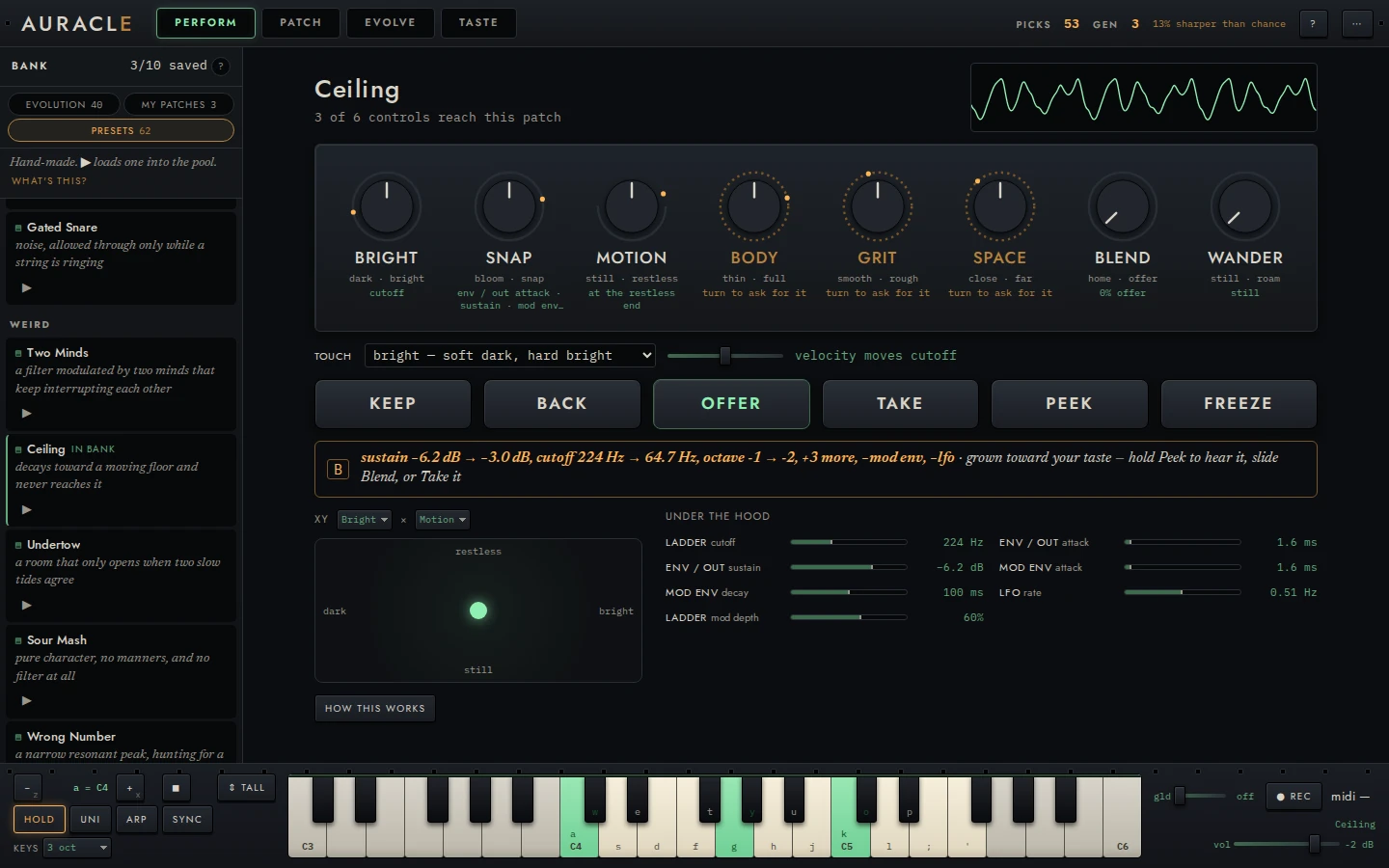
From the top:
The header. The patch's name, a status line, and a small scope. The status line says what PERFORM is doing: measuring how this patch moves…, 4 of 6 controls reach this patch, wander: drift, paused — your hands are on it.
Eight controls in a row. Six named controls (Bright, Snap, Motion, Body, Grit, Space), then Blend and Wander. Each named control is bipolar and its centre is the sound as it is now. A small amber dot on the outer ring shows where the sound measures on that axis, relative to the patches in your session, so a patch that is already very bright has its dot near the right stop.
Six pads. Keep · Back · Offer · Take · Peek · Freeze, below.
The B strip. One line, labelled B, that says whether an offer is waiting and where it came from.
Under the hood. The patch's own knobs that the controls (and Wander) are turning right now, each as a bar with its value in its own units and a tick where it sat when this sound became home. Turn Motion and you watch the envelope's decay and the filter's mod depth move; let Wander drift and the knobs it carries away from home join the list. Click one to open its module in PATCH, pulsing where it is. PATCH shows the sound you last kept: what PERFORM plays is live until you press Keep, and then PATCH has it too.
how this works. A disclosure with a short version of this page. It is closed at rest.
First steps. Until you have done each once, a strip under the header lays out the loop: play a key, turn a lit control, press Offer. Each step ticks off as you do it, and the strip goes away when all three have.
Show measurements in the ⋯ menu adds the numbers behind each control to its tooltip: purity, reach in σ, the verified halves, and the knob gains.
The named controls
| Control | Low · high | What moves in the sound |
|---|---|---|
| Bright | dark · bright | Where the spectrum's energy sits: its centroid and rolloff |
| Snap | bloom · snap | A faster attack and a spikier peak-to-average level |
| Motion | still · restless | How much a held note moves, across slow sweeps, pulsing and flutter |
| Body | thin · full | The share of energy below about 250 Hz |
| Grit | smooth · rough | How noisy the spectrum is rather than tonal |
| Space | close · far | How loud the tail is after the notes stop |
Each is a direction in what the instrument can hear. The motion bands are what Motion listens to; the rest are perceptual descriptors of the same standard render the taste model hears.
The name is fixed. The knobs behind it are not. The first time PERFORM shows a patch, it nudges each of the patch's knobs once, renders the result, and measures how the sound moved. Each control is then wired to at most four of the patch's knobs, the ones that move the sound most purely in the named direction. A full turn moves any one knob at most half its range.
Hover a control to see which knobs it moves, how purely, and how far it measured. The line under its name lists the knobs.
Measuring costs one render per knob, plus up to four more per control to check the result, so a large patch takes a moment. Until the session's pool has warmed up there is nothing to measure against, and the status line says so.
Turning them
| Drag up / down | Turn it. The full range is about 180 pixels |
| shift + drag | Fine |
| Double-click | Back to the centre |
| Near the centre | A light detent, so the centre can be found by feel |
| Long-press (about half a second, without moving) | Hear it |
Turning a control changes knob values only. The voices take them without a recompile, so a held chord keeps sounding through the turn.
Long-press to hear it
A long-press plays the control to you: over about two and a half seconds it sweeps to the low end, across to the high end, and back to where it was. If no note is held it plays a C3 for the length of the sweep. This is the fastest way to learn what a control does on this patch, since the same name moves different knobs on different patches.
Half-closed controls
Sometimes a control can only go one way. A patch with no movement at all cannot be made stiller, and the knobs that would make it so may do something else instead. On First Bass, turning Motion down made the sound very slightly more restless, which is the opposite of the label.
So every half of every control is checked on real renders before it is offered. A half that did not move the sound the way its word says is closed: the ring is drawn only on the side you can turn toward, the control will not go past the centre on the other side, and the line under it says so:
at the still end
Amber, dashed: search controls
A control drawn in amber with a dashed ring is a search control. This patch's knobs cannot honestly make that change. A patch with no drive cannot get rougher by turning a filter, and a patch with no delay or reverb cannot get much farther away. Measured over the preset library, Grit and Space are search controls on most patches for exactly that reason.
The line under it reads turn to ask for it. Turning it about a third of the way to either end and letting go does one of two things.
Where one change would give it something to turn, that change is made.
| Control | What it gets |
|---|---|
| Bright, Body | A tone EQ at the end of the chain (below any reverb, chorus, phaser or flanger), set flat, so the sound does not change until you turn it |
| Space, turned up | A longer amp release (≈250 ms), because every effect here sits before the amp envelope and a reverb's tail is cut at note-off |
It goes onto the workbench as one undo step. The patch is measured again, and the control is set to where your hand left it. The toast names what it now turns. The graft is made once per control per patch, and never twice: a patch that already has an EQ does not get a second one.
Otherwise (Snap, Motion, Grit, Space turned down, or a graft that still did not reach it):
- The control springs back to the centre. No knob moved.
- An offer is grown from the current sound and arrives in B, with a note saying what you asked for.
Grit has no graft because of how it is measured. Grit is spectral flatness, or noisiness. A drive adds harmonics, and harmonics read as Bright. A bitcrusher is transparent only at 16 bits, where turning it changes nothing measurable.
The offer is a variant grown from where you are, on the same walk evolution uses. It is not yet aimed at the direction you turned. It is a structural variant (it may add or change a module), so it can contain the drive or the reverb the patch lacked, but nothing steers it there. Listen before you take it.
Opening the circuit
Everything PERFORM does lands on real knobs, and PATCH shows it while it happens. A knob PERFORM is playing away from its kept value, because a control turned it or Wander moved it, carries a second amber pointer at the value actually sounding, and its readout shows that value in amber. The green pointer is the kept value. Keep writes the amber into the patch, and the two pointers become one. Hover the amber pointer to see which control is turning it.
The XY pad
Under the pads, beside the under-the-hood strip, is an XY pad: two named controls under one finger. It starts as Bright across and Motion up; either axis can be any of the six. Drag to play both at once, double-click to go back to the centre, or use the arrow keys when it has focus (hold shift for fine steps). The pad follows the knobs, so turning Bright on the dial moves the dot too.
Only an axis whose control reaches the patch moves. An amber control's end words are struck through on the pad and a note says so. The pad has no "turn to ask" gesture; use the dial for that.
Blend, Peek and the B slot
An offer is a second patch, loaded into a second voice set that follows the same hands. Every note you play sounds on both. You hear B by crossfading to it, never by a jump:
- Blend sets the mix, from home at the left to offer at the right.
- Peek plays B alone for as long as you hold it. Let go and the mix returns to wherever Blend is.
- Take makes the offer your sound.
The crossfade is equal-power, so the overall level stays roughly steady across it, and B is played at matched loudness: it is normalized to −18 LUFS, the same way every patch is. A louder sound reliably wins a comparison, so without that the crossfade would be a volume knob.
The named controls turn A, the sound you are on. They do not change the offer.
Wander
Wander sets how alive the patch is on its own. It is one dial with four regions, left to right:
| Region | What happens |
|---|---|
| still | Nothing moves unless you move it |
| offer | Every 24 seconds or so, if B is empty, an offer is grown into it |
| drift | The knobs glide to a nearby setting the walk prefers: one move every 36 seconds at the left of the region, every 14 at the right, each glide taking 6 to 4 seconds |
| roam | The same, with longer walks and so bigger moves: one every 12 to 7 seconds, gliding in 3 to 2 |
Wander only runs while PERFORM is on screen. When the walk finds nothing it prefers nearby, the status line says nothing nearby it likes better — staying and the sound stays put.
Structure never changes on its own. Drift and roam move knob values only, and they respect the locks you set in PATCH. A new module only ever arrives as an offer in B, and only becomes your sound if you take it.
Hands on, it waits. Touching any control or pad, or moving one from MIDI, pauses Wander for three and a half seconds. A touch in the middle of a glide stops the glide where it is, and the sound stays there. It never snaps back and never finishes the move behind you.
Tap to hold. A short tap on Wander (or the Freeze pad) freezes it where it is. The dial reads held. Tap again to release.
The pads
| Pad | |
|---|---|
| Keep | Make the sound you hear home. The controls' positions are written into the patch, which goes onto the workbench as one undo step, so PATCH shows it. The controls then re-centre on it |
| Back | Glide back to home, the last sound you kept or loaded |
| Offer | Grow a variant from here into B |
| Take | Make the offer in B your sound. It becomes home |
| Peek | Hold to hear the offer alone |
| Freeze | Freeze Wander. Same as tapping the Wander dial (not the dock's hold, which latches notes) |
Keep puts the sound on the workbench. It does not save it to your bank; do that from PATCH as usual.
Nothing opens a dialog
Nothing reachable from PERFORM opens a modal. A player in the middle of a phrase cannot answer a question, so everything PERFORM needs to tell you arrives as a line in the status bar, the B strip or the note lane, and everything it offers you is a pad you can ignore. The comparison PATCH asks for before evolve from this is here as Keep and Back, which you press when you like.
Before you have taught it anything
Offers and drift walk toward your taste. Before there is a fitted model there is no taste to walk toward, so they are drawn from the grammar instead, which is what the model believes before it has any evidence. They still only ever land on patches that pass the vetting gate. PERFORM says which you are hearing:
drifting through the grammar — no taste yet
an offer is waiting, drawn from the grammar — it has not learned your taste yet
Once a model has been fitted, the same lines read drifting toward your taste and grown toward your taste.
What PERFORM teaches the model
An offer you heard and answered is a pick. An offer is the model's proposal played against the sound in your hands, which is the question an EVOLVE duel asks, asked without stopping the music. Once you have heard B, the answer counts:
| You | It records |
|---|---|
| Take it | B over what you had |
| Press Offer again | What you had over B |
"Heard" means Peek held, or Blend past half, for at least a second while notes were sounding. An offer you take or pass on without hearing it teaches nothing. A Take waits eight seconds before it counts, and its toast has a don't count it button: taking a sound to hear it in place is not always a verdict.
Both directions count, deliberately. A log that only recorded takes would be
the model hearing its own proposals agreed with. The answers enter the model
exactly as duels do, and they are tagged perform_offer, so TRUST scores them
as their own stream (offers you took or passed) beside dealt duels. If
answers given mid-performance turn out less reliable than dealt ones, that is
where it will show.
Keep, Back, control turns and Wander are still only logged. A Keep might mean I love this or hold on a moment; a turn is a gesture, not a verdict.
MIDI
Plug in a controller and turn its first eight knobs: they take PERFORM's eight controls, in the order you turn them. Channel pressure brightens and the mod wheel drives Motion. See MIDI for the whole map, including learn, endless encoders and soft takeover.
For how the controls are wired and checked, with the measurements, see the reference: Performance: named controls and the drift walk.