Your first session
This page takes you from the first sound to a generation bred toward your taste, in about fifteen minutes. Each step is one thing to do, and what you’ll see when you’ve done it.
Open the instrument. There is nothing to install, and everything below happens in one browser tab. Your session is kept in this browser as you play, and it’s there when you come back.
1. Let it listen
- Open the instrument.
- Wait for the boot card to fill.
The card carries Auracle's line, A synthesizer that grows toward you, and reads listening to 40 sounds: you start as soon as the first 8 land. Each of the 40 is drawn from the grammar, rendered on one five-second phrase, checked, and measured. Once eight have landed the instrument opens, and the rest arrive while you play. When you come back, it reads restoring your bank & taste… instead, and opens once your whole session is back.
How it works: nothing plays unchecked
How it works: nothing plays unchecked
Every sound is rendered and checked before it can reach your speakers. Its samples must be finite, its peak under a ceiling, and it must be neither silent nor mostly DC offset. Breeding does produce screaming resonance and silent duds, and this check is why you never hear them.
A sound that fails is quarantined, and the search learns to avoid that region. On a machine with cores to spare, the renders run side by side. The vetting gate in the reference has the thresholds.
2. Pick the three you’d reach for
The warm start opens over the instrument. It teaches the model 18 picks in about thirty seconds, which is the difference between a model that has a guess by the end of this session and one that doesn’t.
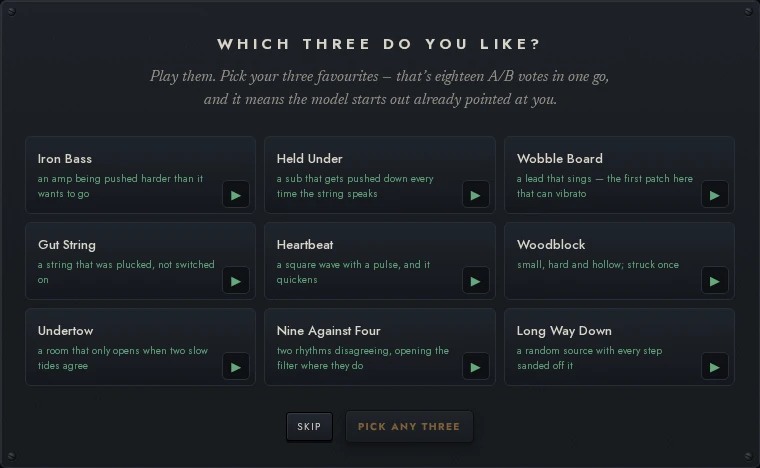
- Press ▶ on a card to hear it. Press it again to stop.
- Click the three you’d reach for. Pick on sound alone: there is no wrong answer.
- Press TEACH IT.
The card is headed PICK THE THREE YOU’D REACH FOR, over nine presets drawn one per family from the library, each with its face, which comes with the app, so it is there with the card. The button under them counts down as you pick (PICK ANY THREE, 2 MORE, 1 MORE). At the third pick it reads TEACH IT and lights up amber: that’s the next step. On a phone the cards scroll, and SKIP and the button stay at the bottom of the screen.
When you press it, PERFORM opens on your first pick, and TAUGHT in the menu bar reads 18. The toast says what happened: Your three taught it 18 picks, so it starts out pointed at you. Your three are saved, and Glass Pad is under your fingers.
Your three are saved, so no generation will replace them. They take 3 of your 10 save slots; release any of them from its row if you want the room.
At the bottom left, a pill shows the first things to try in PERFORM, one step at a time: Play a key, then a control to turn on this sound (on a sound none of them reach, the pill leaves this step out, pip and all, and asks for it again on a sound one of them turns), then Press OFFER, then Press ⌥↑ to zoom out to TASTE, and last Hold ⌥ to see what the model believes. Each ticks off (a pip fills) when you do it, not when you read it. When they are done, the pill says what the loop was and goes; it says that only once, so a turn it comes back for later just ticks off. × stops PERFORM's showing. PATCH has four of its own, in the same pill under its well: Play it (done already if you have played), Drag a knob, Lock what you love, and Press ⚡ EVOLVE FROM THIS; its × stops those. It is the one place first steps are shown.
How it works: why three picks are worth 18
How it works: why three picks are worth 18
Each of your three picks is recorded as a pick over each of the six you passed over: three times six. These picks fade with time like any other, so the warm start points the model at you without holding it there.
SKIP goes straight to the instrument. A few picks later it offers the warm start once more, and you can run it again any time from ⌘K: Re-run the three-pick warm start.
3. Pick between pairs
EVOLVE is where you teach the model most. It plays you two sounds, A and B, on the same phrase, and you pick the one you’d reach for.
PERFORM, PATCH, EVOLVE, TASTE and LEARNING are the levels of one space around the sound you’re playing, and the stops at the stage’s right edge show where you are: TASTE and LEARNING above PERFORM, PATCH below it, and EVOLVE beside it. Click a stop to go there, or press ⌥← for EVOLVE, ⌥↑ and ⌥↓ to zoom out and in (or hold ⌥ and turn the wheel), and ⌥1–⌥5 for each level (Alt off a Mac). The menu bar names the level you’re at, and as you move, the face of the sound you’re playing travels with you to where the next level draws it.
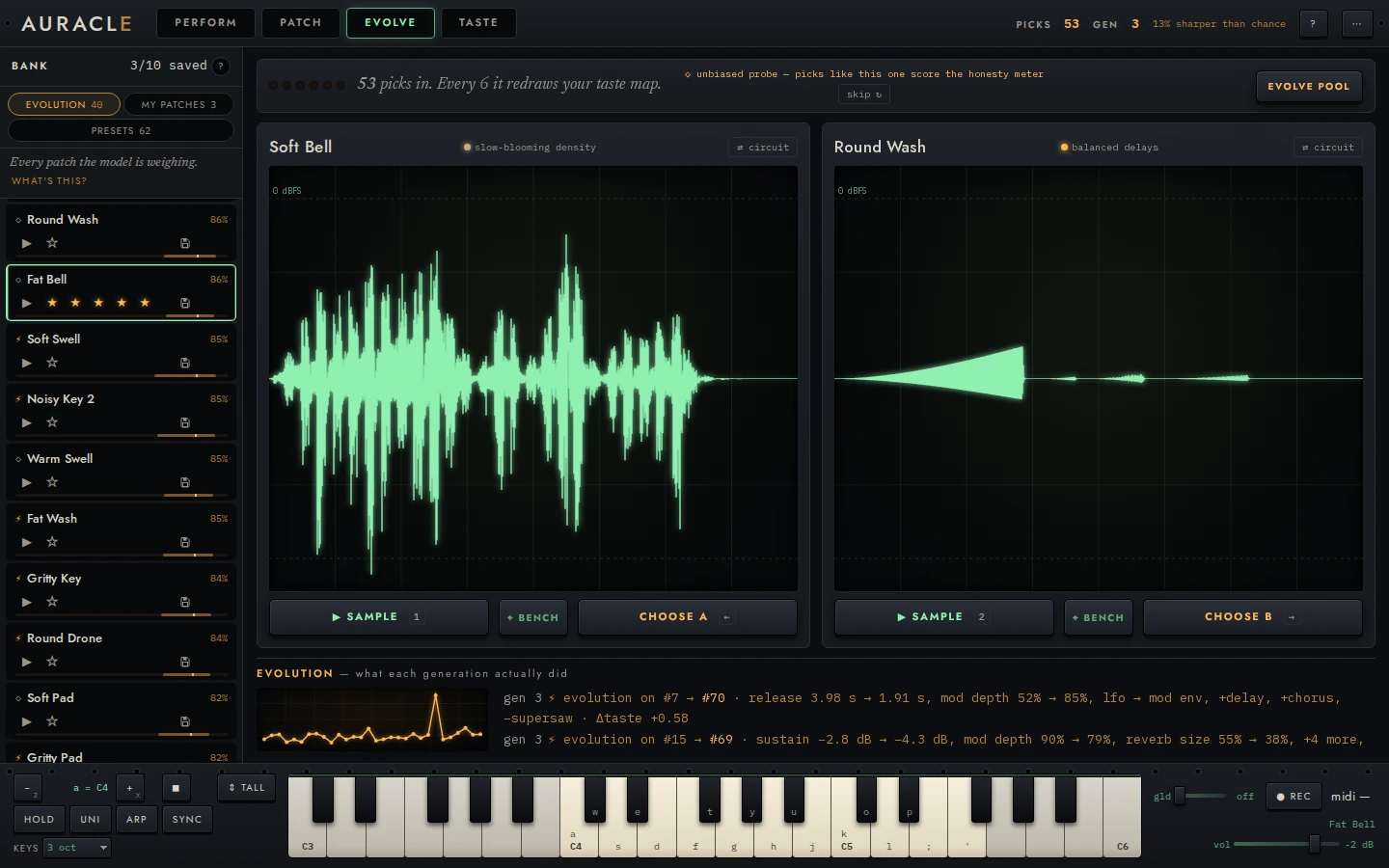
- Go to EVOLVE: its stop, left of PERFORM’s, or ⌥←.
- Press 1 and 2 (or ▶ PLAY on each card) to hear A and B.
- Click a card’s body to play that sound live on the keys, if the phrase doesn’t tell you enough.
- Press ← or → (or PICK A, PICK B) for the one you’d reach for.
- Press ANOTHER PAIR (N) when a pair tells you nothing.
Ten or fifteen picks is a good first batch. If neither sound is one you’d reach for, pick the nearer one: what the model learns from a pick is a direction, and that’s still one. The model expects answers to waver, and averages over them.
What you see:
- The line above the cards. Before your first pick it reads Play both. Pick the one you’d reach for. After that it counts down to the next redraw (3 more picks and it redraws your taste map.), and six pips fill as you go.
- The forecast. After each pick, the model says what it guessed before you picked: it guessed this · 72% · fairly sure, or it guessed the other · 62% · leaning. Its misses are how it learns.
- The toast. Picked Glass Pad over Soft Wash., with NOT WHAT I MEANT for seven seconds. ⌘Z (Ctrl Z) does the same.
- The refit. On the sixth pick the line reads ● learning from your last 6 picks…, and the amber lamp after the wordmark lights while the model fits. Then it reads ● it just learned: see what changed ▸, and the link opens TASTE.
4. See what it learned
- Go to TASTE (⌥↑ from PERFORM or EVOLVE): every sound in the pool, glowing by how much the model guesses you’d like it. Point at one to see its card.
- Go to LEARNING (⌥↑ again), and read each style’s name on its chip.
- Read ITS FORECASTS, and see how close it is to grading the model.
Early on the glows are a first guess, and the styles too. A style is named for what it leans toward until you rename it, so a style called analog sustain means the model has heard you leaning that way.
LEARNING grades the model once it has made 20 guesses, one before each pick, and until then it counts toward them (calibrating · 4/20). Once it has 20, it will likely say not beating a coin flip yet. That is the honest answer this early, and the LEARNING guide says why a plain hit rate would have flattered it.
5. Breed a generation
- Go to EVOLVE.
- Press EVOLVE POOL.
- Play the new sounds as they land at the top of the bank.
The model takes the ten sounds it rates highest and walks a short way from each, toward what it has learned. Hover EVOLVE POOL before you press it, and the bank marks those ten SEED. EVOLVE POOL becomes its own progress bar, saying each walk as it comes back (WALK 3 OF 10 joined the pool), with STOP beside it, and the job slot in the menu bar counts the walks at every level. A generation takes from under a minute to a few, depending on the machine, and the instrument keeps answering while it breeds.
Each child appears the moment it’s bred, at the top of the bank under NEW · GENERATION 1, tagged NEW, with the seed it grew from under its name. The WHAT EACH GENERATION DID, under EVOLVE POOL, says what each step changed:
gen 1 ⚡ bred from Soft Pad → Warm Drone 2 · release 100 ms → 251 ms,
cutoff 1.78 kHz → 20 kHz, delay → chorus, +lfo · liked +0.62
liked is how much more the model guesses you’d like the child than its seed. A step it rated lower is tagged exploring: the walk sometimes steps sideways or down so it doesn’t get stuck, and your next picks say whether it was worth it.
How it works: what a generation does
How it works: what a generation does
There is no crossover: every child grows from one seed. Each walk is about 40 small changes to the seed’s knobs and modules, each one rendered, measured, and kept or refused by how the model rates it.
A child joins the pool only if the model rates it above the sound it would replace: the lowest-rated one it can, not saved, nor kept as new and still waiting for its first pick. When the generation ends, those sounds are replaced and the toast names them. Refinement in the reference has the walk in full.
Then go back to picking. The new sounds are in the pairs now, and every pick still teaches the model and tests its forecast.
6. Keep what you’d reach for again
A bank row has two ways to keep a sound, and they do different jobs:
- ★ rates it. That teaches the model.
- save keeps it. The sound stays in POOL, is listed in SAVED too, and no generation will replace it. It teaches the model nothing.
Stars are not saves says when you want which.
What to try next
- Turn some knobs: reading and editing the rack.
- Rewire it: wiring and the catalog.
- Play it: playing it and PERFORM.
- Lock what you love and breed around it: ⚡ evolve from this.
- See what the model learns from: what the model learns from.
Press ⌘K in the app at any point (or ? anywhere but over one of PERFORM’s controls) for every command with its key, and the keyboard map has them all in one place.